快速指南
快速开始
快速开始
通过快速开始指南,学习如何获取 API Key 并发起第一个 API 请求!
前提条件
- 注册 / 登录 API工厂 平台账号
- 一个 API Key
获取 API Key
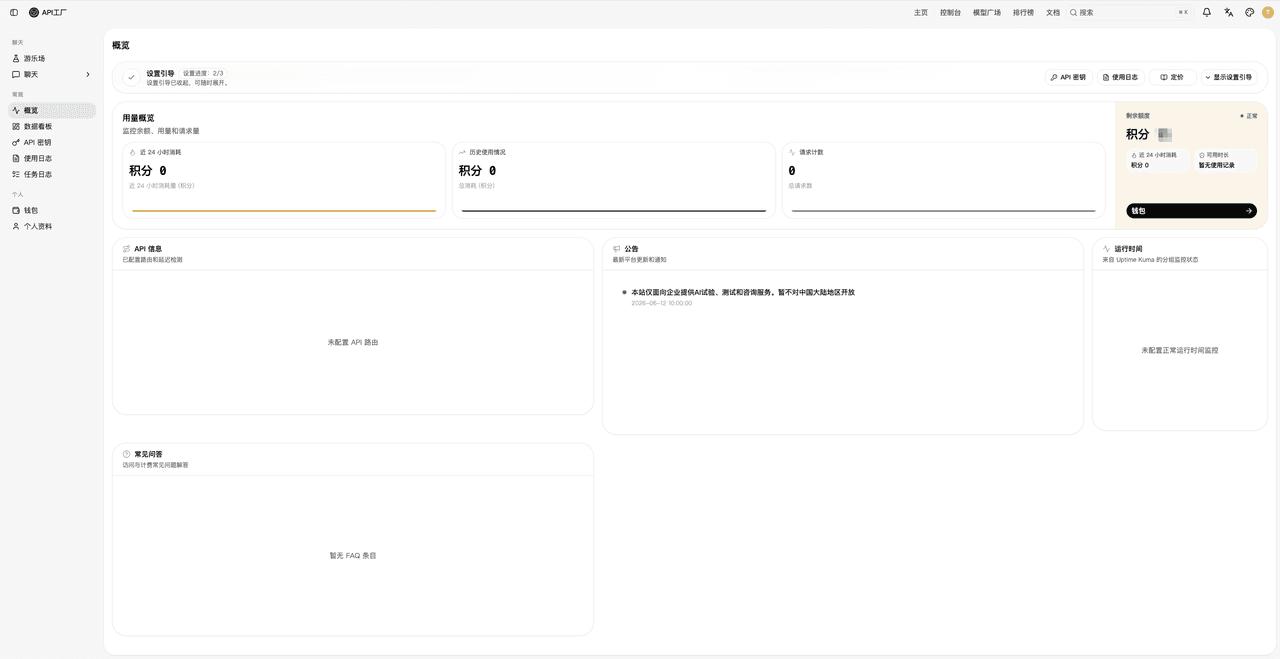
第一步:登录平台
进入 API工厂 管理后台。
第二步:创建密钥
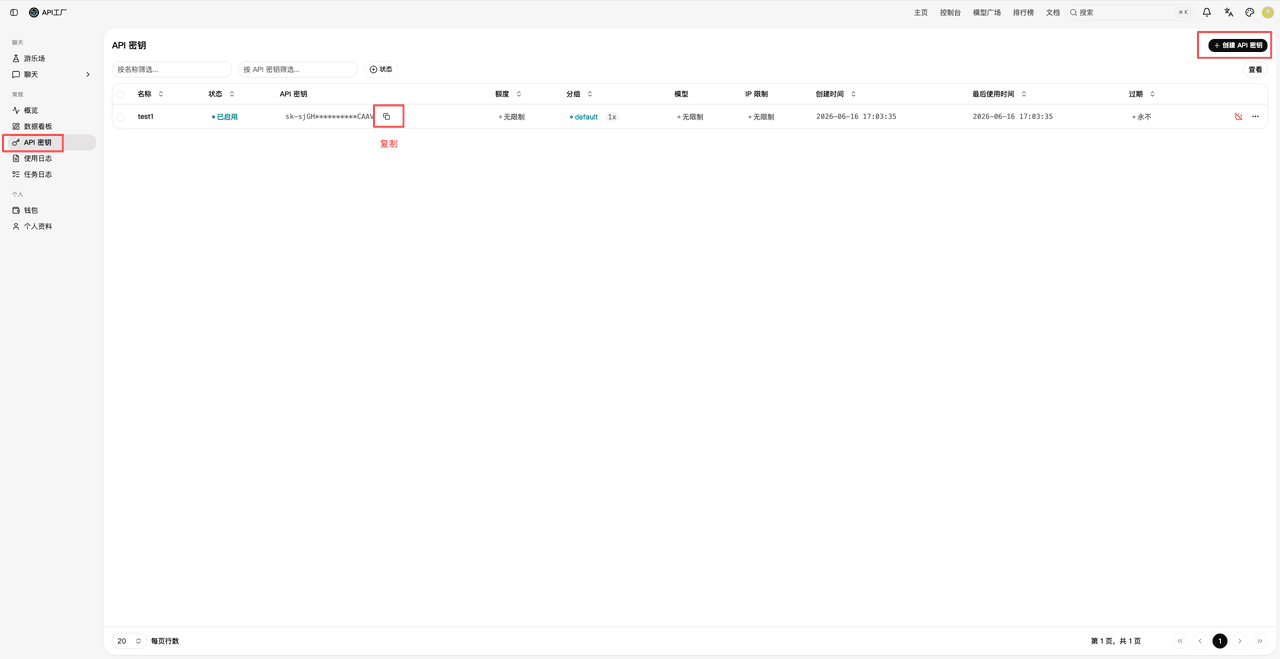
进入 API 密钥管理 页面,点击 创建新密钥,输入密钥名称并保存。
第三步:复制密钥
在 API 密钥页面,点击密钥旁的复制图标,复制到剪贴板。
配置 HTTP 请求
所有 API 请求通过 AIKey Header 认证:
AIKey: your-api-key
Content-Type: application/json; charset=UTF-8
Base URL:https://api.3hei.com
快速示例
使用 Seedance 生成视频
curl -X POST "https://api.3hei.com/ai/seedance/videos" \
  -H "AIKey: your-api-key" \
  -H "Content-Type: application/json" \
  -d '{
    "model": "doubao-seedance-2-0-fast",
    "content": [
      { "type": "text", "text": "一只毛茸茸的橘猫在阳光明媚的草地上奔跑" }
    ],
    "resolution": "720p",
    "ratio": "16:9",
    "duration": 5
  }'
响应:
{
  "code": 0,
  "info": "success",
  "result": {
    "task_id": "task_12345"
  }
}
轮询 /ai/seedance/result?task_id=task_12345 获取生成的视频。
可用视频模型:
doubao-seedance-2-0(高品质)、doubao-seedance-2-0-fast(更快速低成本)。
使用 Nano Banana (Gemini 图片) 生成图片
curl -X POST "https://api.3hei.com/ai/gemini/image/generate" \
  -H "AIKey: your-api-key" \
  -H "Content-Type: application/json" \
  -d '{
    "prompt": "未来城市夜景,霓虹灯倒映在湿润的街道上",
    "action": "generate",
    "model": "nano-banana-fast",
    "aspect_ratio": "16:9"
  }'
响应:
{
  "code": 0,
  "info": "success",
  "result": {
    "taskCode": "task_12345"
  }
}
轮询 /ai/gemini/result?code=task_12345 获取生成的图片。
可用图片模型:
nano-banana-fast、nano-banana-pro(支持 1K/2K/4K 分辨率)、nano-banana-2(支持更多比例)。
使用 OpenAI 原生协议生成图片
直接使用 OpenAI SDK,只需更改 base_url:
from openai import OpenAI
import base64

client = OpenAI(
    api_key="your-api-key",
    base_url="https://api.3hei.com"
)

result = client.images.generate(
    model="gpt-image-2",
    prompt="一本儿童绘本插画,画着兽医正用听诊器倾听一只小水獭的心跳。"
)

image_base64 = result.data[0].b64_json
image_bytes = base64.b64decode(image_base64)

with open("otter.png", "wb") as f:
    f.write(image_bytes)
import OpenAI from 'openai';
import fs from 'fs';
const client = new OpenAI({
apiKey: 'your-api-key',
baseURL: 'https://api.3hei.com'
});
const result = await client.images.generate({
model: 'gpt-image-2',
prompt: '一本儿童绘本插画,画着兽医正用听诊器倾听一只小水獭的心跳。'
});
const image_bytes = Buffer.from(result.data[0].b64_json, 'base64');
fs.writeFileSync('otter.png', image_bytes);curl -X POST "https://api.3hei.com/v1/images/generations" \
-H "Authorization: Bearer your-api-key" \
-H "Content-Type: application/json" \
-d '{
"model": "gpt-image-2",
"prompt": "一本儿童绘本插画,画着兽医正用听诊器倾听一只小水獭的心跳。"
}' | jq -r '.data[0].b64_json' | base64 --decode > otter.png可用模型:
gpt-image-2。
使用 Chat LLM 对话(OpenAI 兼容)
直接使用 OpenAI SDK,只需更改 base_url:
from openai import OpenAI

client = OpenAI(
    api_key="your-api-key",
    base_url="https://api.3hei.com"
)

response = client.chat.completions.create(
    model="gpt-5.1",
    messages=[
        {"role": "system", "content": "你是一个有帮助的助手。"},
        {"role": "user", "content": "你好!"}
    ]
)

print(response.choices[0].message.content)
import OpenAI from 'openai';
const client = new OpenAI({
apiKey: 'your-api-key',
baseURL: 'https://api.3hei.com'
});
const response = await client.chat.completions.create({
model: 'gpt-5.1',
messages: [
{ role: 'system', content: '你是一个有帮助的助手。' },
{ role: 'user', content: '你好!' }
]
});
console.log(response.choices[0].message.content);curl -X POST "https://api.3hei.com/v1/chat/completions" \
-H "Authorization: Bearer your-api-key" \
-H "Content-Type: application/json" \
-d '{
"model": "gpt-5.1",
"messages": [
{"role": "system", "content": "你是一个有帮助的助手。"},
{"role": "user", "content": "你好!"}
]
}'使用 Claude 协议
配置环境变量即可使用 Anthropic SDK:
export ANTHROPIC_API_KEY="your-api-key"
export ANTHROPIC_BASE_URL="https://api.3hei.com"
from anthropic import Anthropic
client = Anthropic()
response = client.messages.create(
model="claude-sonnet-4-6",
max_tokens=1024,
messages=[{"role": "user", "content": "你好!"}]
)
print(response.content[0].text)注意:Claude 协议端点为
/v1/messages,与 OpenAI 端点共用同一 Base URL,认证方式统一使用 Bearer token。
异步任务模式
大部分生成服务(Seedance 视频、Gemini 图片)遵循异步任务模式:
1. POST 请求 → 返回 taskCode / task_id
2. 用 taskCode / task_id 轮询 GET 端点 → 完成后返回状态 + 结果| 服务 | 创建任务 | 轮询状态 |
|---|---|---|
| Seedance 视频 | POST /ai/seedance/videos | GET /ai/seedance/result?task_id=xxx |
| Gemini 图片 | POST /ai/gemini/image/generate | GET /ai/gemini/result?code=xxx |
| OpenAI 图片 | POST /v1/images/generations | 同步返回 |
建议轮询间隔:每 3-5 秒。
下一步
完成第一个 API 请求后,探索更多功能:
- 平台介绍 -- 所有服务的完整概览
- OpenAI 协议 | Claude 协议 | Gemini 协议
- Seedance 视频 -- Doubao Seedance 视频生成
- Nano Banana 图片 -- Gemini Nano Banana 图片生成
- OpenAI 图片 -- DALL-E / GPT-Image 图片生成
需要帮助?
- 查看各服务的 API 文档了解端点规格:Seedance 视频、Nano Banana 图片、OpenAI 图片
- 查看 平台介绍 了解完整功能概览
- API 调用记录 -- 查看历史调用和用量
- API Lab 在线调试 -- 在线测试 API 接口
准备好构建 AI 驱动的精彩应用了吗?立即使用 API工厂 开始创作!